
ISSUE 014 · Put it to work
Are your AI subscriptions earning their place in your budget?
Use a 30-minute audit to compare recurring AI costs with work completed, time saved, and tools you can cancel or downgrade.
The inference
Treat every AI subscription like a small recurring business expense. Keep the services that help you finish useful work, downgrade the ones that duplicate another tool, and cancel the ones you keep meaning to try.
Reuters recently reported that some young people are paying for premium AI tools to work faster, launch businesses, and manage everyday tasks. That makes a familiar budgeting question more pressing: which subscriptions are delivering enough value to stay on the monthly bill? (Reuters)
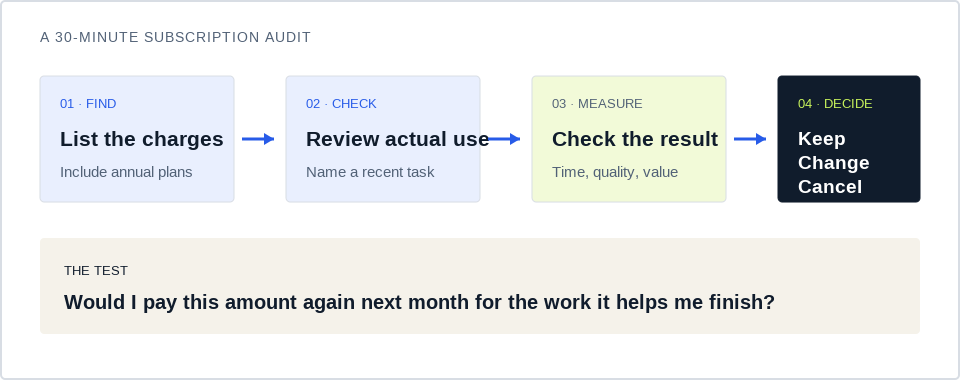
An audit turns a stack of monthly charges into a short keep, downgrade, pause, or cancel list.
Start with the full bill
Write down every AI-related charge from the past 2 months. Check app-store subscriptions, credit-card and bank statements, software invoices, and any work account where you pay personally. Include monthly and annual plans, add-on credits, transcription or image-generation services, and tools bundled into a larger package.
For annual plans, divide the renewal price by 12 so you can compare it with monthly charges. A $120 annual plan costs $10 per month on that basis. Mark the renewal date too. A service can look inexpensive until it renews for another year.
| Subscription | Monthly equivalent | Used in the last 30 days? | Work it helped finish | First decision |
|---|---|---|---|---|
| General-purpose assistant | $20 | Yes | Drafted and revised 6 client proposals | Keep, then review results |
| Image tool | $15 | No | None recorded | Cancel or pause |
| Meeting assistant | $12 | Yes | Produced notes for 4 meetings | Compare with built-in tools |
| Annual research tool | $8 | Yes | Found sources for a report | Keep if quality checks pass |
Example figures only. Replace them with your own charges and results.
Track results you can see
“Useful” can mean several things: less time spent on a task, work you could not take on before, fewer outside expenses, or a result that is easier to review. Choose one measure per subscription so the comparison stays manageable.
For a work tool, estimate the time you saved on tasks you completed. Multiply those hours by a reasonable value for your time, then subtract the subscription fee. If you bill by the hour, use your rate. If you are salaried, use a conservative estimate and treat the result as capacity gained, not cash in hand.
Monthly value estimate = useful hours saved × value per hour
Net estimate = monthly value estimate − subscription cost
Say a $20 tool saves 90 minutes on two recurring tasks each month. At a personal value of $25 per hour, that is $75 in estimated time value, leaving $55 after the fee. The estimate only holds if the time really goes back into paid work, rest, or another priority. If the saved time gets absorbed by extra revisions, the benefit is smaller.
For personal use, a financial return may be the wrong yardstick. A tool that helps you study, plan a trip, or organize family tasks can be worth paying for. Set a comfortable monthly amount for that kind of convenience, then decide which tools fit inside it.
Compare overlapping tools
Several subscriptions may handle the same task. Pick one recurring job, such as summarizing meeting notes or editing a short document, and compare the tools you already pay for. Use the same input and judge the result against the same criteria.
| Check | What to record |
|---|---|
| Output quality | Did it produce something accurate and ready to use? |
| Your review time | How many minutes did you spend checking and correcting it? |
| Total cost | Subscription, credits, and any extra service fees |
| Privacy fit | Is the data allowed in this service under your personal or work rules? |
| Friction | Did it fit your workflow, or create extra copying and setup? |
A free tier or a tool already included in software you use may cover occasional tasks. Before switching, check limits that matter to you, such as file size, usage caps, data retention, and export options. A lower price can come with constraints that make the tool a poor fit for a particular task.
Make four decisions
Keep a service when you use it regularly, it supports work or personal goals, and its quality justifies the fee.
Downgrade when you use it, but rarely need its premium capacity. Confirm that the lower tier still supports your important tasks before changing plans.
Pause when you are unsure. Turn off renewal for one billing cycle and note what you miss. If nothing changes, the service may not need a place in your budget.
Cancel when you have not used it, another subscription already does the same job, or its results demand more correction than they save in effort. Export anything you need and check whether cancellation removes stored projects or history.
Put it to work: a 30-minute audit
- Gather charges (10 minutes). Search the last 2 statements for app, AI, assistant, model, and software charges. Check app-store billing and work reimbursements too.
- Match charges to tasks (10 minutes). For each service, write down the last real task it helped complete and the date you last used it.
- Choose one action (5 minutes). Keep, downgrade, pause, or cancel. Put annual renewal dates on your calendar.
- Set a review date (5 minutes). Revisit the list in 30 days. Track whether any canceled tool was genuinely missed before signing up again.
A subscription earns its place when it reliably helps you do something you value at a price you accept. A short monthly check can keep experiments from becoming permanent expenses.
Sources
This week’s AI news
Snapshot for 2026-11-09 through 2026-11-15.
Sentiment: Everyday AI is getting faster and more capable, but this week’s reports on unreliable shopping links, a major cloud outage, and gaps in financial guidance show why verification and fallback plans still matter. (Google, The Verge, BBC)
People are talking about: How much to rely on AI for everyday decisions, whether AI-generated recommendations can be trusted with money, and what happens when work depends on a small number of cloud providers. (Reuters, The Verge, BBC)
Model releases & benchmarks (the “excitement” beat)
- Google released Gemini 4 Hydrogen for everyday work and agentic tasks: Google says it is faster and more capable than its previous Flash model, and is making it available in Search, the Gemini app, and developer and business products. Those are company-reported comparisons, but the broad rollout makes it a practical option for writing, research, and coding workflows. (Google, Ars Technica)
Safety, security & governance (the “anxious” beat)
-
A study found AI chatbots sometimes point shoppers to risky websites: In a test of 6,795 answers about 151 brands, Podqi found risky sites in responses from Perplexity, ChatGPT, and Gemini. The study was commissioned by a brand-protection firm, used its own prompts, and is not a measure of real-world scam rates. For shoppers, the practical step is to verify a retailer through its official site before entering payment details. (The Verge, Podqi)
-
A benchmark found gaps in AI-generated financial guidance: Vals AI and NextLadder Ventures tested 28 models across 256 simulated financial-counseling scenarios. The evaluators reported that models sometimes advised before asking for essential details or missed deadlines and available assistance. The test used simulated conversations, so it does not establish how often people are harmed in real use, but it is a reason to treat AI as a starting point, not a substitute for qualified financial help. (Vals AI benchmark, PRNewswire)
Funding, infrastructure & economics (the “boom or bubble?” beat)
- Reuters reported that AI subscriptions are becoming a recurring expense for some young users: Its report describes young people paying for premium AI products to work faster, start businesses, and manage daily life. The practical question for any subscriber is whether the tools deliver enough measurable value to justify keeping each recurring charge. (Reuters)
Backlash, labor & trust (the skeptical beat)
- A worldwide Microsoft outage disrupted Outlook, Teams, and Copilot: Microsoft said a problem introduced during a network-capacity upgrade caused the outage, which affected users in more than 70 countries before services were restored. The disruption is a reminder for households and workplaces to keep essential phone numbers, alternate communication methods, and copies of critical information outside a single cloud service. (BBC)
Free weekly briefing
Get the next issue
Practical AI intelligence, delivered weekly.
Email address
By subscribing, you agree to receive the weekly newsletter. Unsubscribe at any time.Privacy details.
Open the signup page if the form does not load.