
ISSUE 013 · Put it to work
Secure the AI tools you use before they become part of your workflow
A practical checklist for checking an AI tool's access, protecting your accounts, and responding safely when a service or agent handles your data.
The inference
Treat an AI tool like any other account that can see or change your information: give it only the access needed for the task, keep a person between the tool and consequential actions, and remove access when the task ends.
That advice applies to consumer assistants, workplace copilots, browser extensions, coding agents, and services that connect to email, calendars, files, or business systems. A recent security investigation found more than 800 deployments of the Artex automated penetration-testing tool reachable from the internet without a password. Artex is designed to probe computer systems for weaknesses. Researchers said they could not determine why all those systems were exposed, and noted that some may have been used for authorized security work. The report is a specific warning about exposed tools and weak configuration, rather than evidence that every AI product is unsafe. (TechCrunch, Censys)
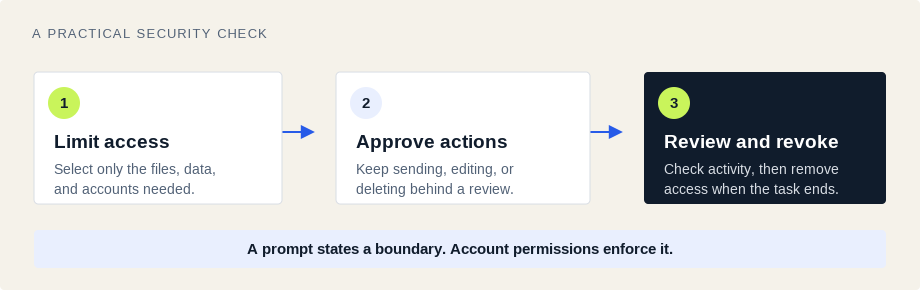
Access, approval, and review work together. A careful prompt cannot replace account controls.
Check the connection before you approve it
When a tool asks to connect to an account, pause long enough to answer three questions: What information can it read? What can it change or send? How will I turn access off?
A request to “connect Google Drive” may cover more than the one document you want summarized. A calendar assistant might need to read availability, but it may also request the ability to create or edit events. Exact permissions vary by service and account type, so read the authorization screen and the provider’s explanation. If the requested access is broader than the task, choose a narrower option or keep the work manual.
| Task | Safer starting access | Keep approval for |
|---|---|---|
| Summarize a selected document | Upload or select that file | Sharing the summary outside your account |
| Draft a reply to one email | Read the chosen thread; create a draft | Sending the message |
| Find an open meeting time | Read availability | Inviting attendees or changing existing events |
| Organize project files | Read one approved folder | Moving, deleting, or sharing files |
| Review code | Read the relevant repository or branch | Merging changes, deploying, or exposing secrets |
If your organization provides an approved AI service, use that account for work. Do not route confidential documents through a personal account because it happens to be more convenient. Follow workplace rules on customer information, regulated data, retention, and approved software.
Give the tool the least access that works
Use these steps before connecting an AI service to important accounts:
- Name the task. “Summarize this one meeting agenda” is easier to scope than “manage my files.”
- Select the source yourself. Choose a specific file, email thread, folder, or test environment where possible.
- Check the permission request. Look for broad access, persistent access, and permission to send, edit, delete, or invite.
- Start in read-only or draft mode. Let the tool prepare an answer or proposed change. Review it before anything leaves your account or alters shared data.
- Test with low-risk information. Use a copy or sample data first. Avoid passwords, recovery codes, private keys, payment information, and personal or customer details that are not necessary.
- Revoke access when finished. Review connected apps in the account’s security settings. Remove tools you no longer use and check their history or saved files under your organization’s retention rules.
A prompt can restate your limits, but it cannot enforce them. If an agent has permission to send email, telling it “do not send” is weaker than keeping send permission disabled until you approve.
Notice the warning signs
Stop and verify before proceeding if a tool:
- asks for an account password or recovery code in a chat or form instead of using the account provider’s normal sign-in process;
- requests permission to read or change unrelated accounts, files, or settings;
- asks you to install an extension or run a command from an unverified source;
- sends unexpected sign-in alerts, security prompts, or messages after you connect it;
- starts taking actions you did not request, or cannot show you what it accessed.
The Artex findings also show why administrators should check how tools are deployed. Censys reported that some exposed instances contained attack-related data and tools. For a business or school, useful basic controls include authentication, network restrictions, software updates, access logs, and a named person responsible for each deployed tool. An AI system should not be reachable from the public internet just because its operator needs remote access; use a protected route and verify the setup with the organization’s security team. (Censys)
If something looks wrong
If you connected a tool and then suspect misuse, use a trusted device and go directly to the account provider’s official site. Revoke the tool’s access, end active sessions if the provider supports it, and change your password if you entered it into an unfamiliar page. Turn on multifactor authentication, review recent sign-ins and account activity, and report work-related incidents to your IT or security team promptly. Do not delete evidence your organization may need to investigate.
For a tool installed on a work device, avoid trying to investigate or remove it on your own if that could damage evidence or violate policy. Contact the designated support team and share what you observed, when it happened, and which account or device was involved.
A quick permission test
Before connecting a tool, finish this sentence: “For this task, it needs to access ___, it may ___, and I will check ___ before it affects anyone else.” If the blanks are hard to fill, narrow the task. If the software cannot limit its access or show what it did, do not connect it to sensitive accounts.
Security comes from the setup around the model: limited permissions, protected accounts, human approval, and a way to review and revoke access. Make those checks routine before an AI service becomes part of your everyday workflow.
Sources
This week’s AI news
Snapshot for 2026-11-04 through 2026-11-10.
Sentiment: AI tools are becoming more integrated into everyday writing and work, but reports of spending limits, uncertain returns, security exposure, and local opposition show that usefulness and trust remain practical constraints. (TechCrunch, TechCrunch, Censys)
People are talking about: How to get useful everyday help from AI without losing control of costs, authorship, security, or the effects data centers have on local communities. (TechCrunch, TechCrunch)
Funding, infrastructure & economics (the “boom or bubble?” beat)
- AI use is rising while reported business spending growth slows: Ramp data cited by TechCrunch found token spend grew 1.5% across August and September, while token volume increased. The source attributes the trend to lower prices and customers controlling costs; for everyday users and workplaces, it underlines the value of tracking whether a paid AI tool saves enough time to justify its cost. (TechCrunch)
- Apple reportedly cut employee allowances for internal AI tools: Bloomberg, as reported by TechCrunch, said Apple’s engineering-team daily spending cap fell from $300 to $200, with some budgets expected to fall further. Apple had not commented to TechCrunch. The report is a reminder that workplace AI access may be subject to usage limits and that teams need to prioritize tasks where it helps most. (TechCrunch)
- Data-center expansion faces more local scrutiny: Meta president Dina Powell McCormick said election-season opposition could make projects harder to build and described approaches such as paying for the electricity and directing tax surpluses to local services. The debate affects residents through electricity demand, land use, jobs, and local tax decisions. (TechCrunch)
Safety, security & governance (the “anxious” beat)
- More than 800 Artex AI hacking-tool deployments were reportedly reachable online without passwords: Security firm Censys found publicly accessible deployments of an autonomous penetration-testing tool. Researchers said not all were malicious, but exposed systems could provide access to attack tools and data. The practical lesson for anyone running AI or security software is to restrict internet exposure, use strong authentication, and review access settings. (TechCrunch, Censys)
Backlash, labor & trust (the skeptical beat)
- Medium launched TK, an AI-assisted writing app: The editor lets writers ask an assistant for research help and feedback while drafting, and Medium says writers can disclose how AI contributed. The app makes a familiar daily question more urgent: decide which parts of a piece are your own judgment, check factual suggestions, and be transparent about AI’s role when it matters to readers. (TechCrunch, Medium)
Free weekly briefing
Get the next issue
Practical AI intelligence, delivered weekly.
Email address
By subscribing, you agree to receive the weekly newsletter. Unsubscribe at any time.Privacy details.
Open the signup page if the form does not load.