
ISSUE 011 · Put it to work
Let an AI agent shop, but don't hand it a blank check
Walmart is preparing agent shopping with spending limits and purchase approvals. Use this checklist to decide what a shopping agent may see, buy, and do without you.
The inference
A shopping agent should get the same authority you’d give a careful assistant: a defined errand, a spending cap, and a chance to check the cart before money moves. Convenience is not a reason to grant open-ended access to your account.
Walmart announced an Agent Gateway and Agent Profiles for customers who want AI agents to shop at Walmart and Sam’s Club. The company says shoppers can set spending limits or require approval for purchases, view agent orders separately, and limit access to personal information. Agent Profiles were described as rolling out the following month, so these controls are announced plans, not a guarantee that every feature is already available. (Walmart, The Verge)
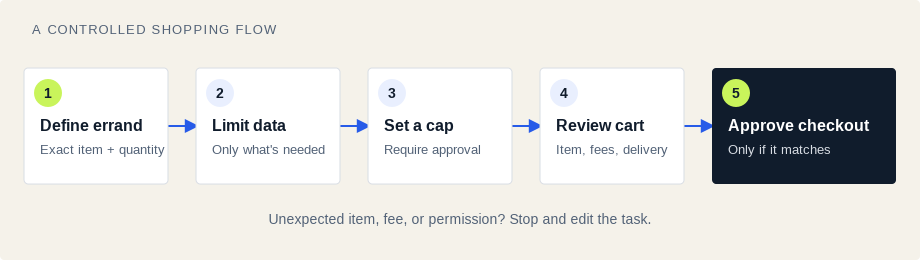
Approval belongs between the agent’s cart and your payment method.
What an agent is being asked to do
A search assistant can compare products and make suggestions. A shopping agent goes further: it may use an account, find products, choose options, and submit an order. Each step adds convenience, but also gives software more room to misunderstand a request.
“Buy my usual coffee” sounds straightforward until there are several sizes, a substitute brand, a sale bundle, or a delivery fee. The agent may select an item that technically matches the words but not your preference. If it can also use saved addresses and payment details, a mistake can become a completed transaction.
The retailer’s Agent Gateway is meant to give approved agents a structured way to search its catalog and make purchases. Walmart says agents won’t receive payment card details and will have to follow rules about acting only within the shopper’s intent. The company says its normal returns process applies if an agent does not act as intended. Those safeguards matter, but they do not replace checking what the agent selected before checkout. (Walmart)
Match the permission to the errand
| Shopping task | Sensible starting permission | Why |
|---|---|---|
| Compare prices for a specific item | Search only, no checkout | You get the research without delegating a purchase |
| Reorder a familiar household item | One purchase, exact product, low cap | Limits the cost of a wrong size or substitute |
| Assemble a weekly grocery cart | Cart creation, approval required | You can check quantities, brands, substitutions, and fees |
| Buy a gift or an unfamiliar product | No autonomous checkout | Recipient, fit, and return rules can be hard to infer |
| Repeat a routine purchase | Narrow spending limit and notifications | Useful only after you know the agent follows your rules |
A spending limit is a ceiling, not a full instruction. A $50 cap might still allow the wrong product, an unwanted substitute, or multiple small purchases. Specify the item, quantity, acceptable alternatives, delivery window, and whether the agent may check out. If you cannot describe a safe rule, keep approval turned on.
A five-step setup before you connect an account
1. Start with a small errand. Choose a familiar, low-cost product you already buy. Do not begin with a large grocery order, a gift, medication, or anything with important size, allergy, compatibility, or timing requirements.
2. Give the agent a narrow task. Name the product and quantity. Say whether substitutes are allowed and what price range is acceptable. “Find two 12-ounce bags of this brand, no substitute, and show me the final total” is safer than “stock up on coffee.”
3. Check what information it can access. Use the minimum account connection needed. Find out whether the agent can see purchase history, saved addresses, household profiles, or payment options. Walmart says its gateway is designed to give agents only the information needed for a task, but check the settings shown in the product you use. (Walmart)
4. Require approval while you learn its behavior. Review the exact item, quantity, seller, delivery date, fees, substitutions, and final price. Do not approve a cart based only on a short summary. Confirm the checkout screen yourself.
5. Review the order and revoke access when finished. Check the confirmation and transaction history. Remove the agent profile or disconnect the service if you do not plan to use it again. Keep order alerts on, and know how to cancel or return an item.
What to check before tapping approve
| Check | Ask yourself |
|---|---|
| Product | Is this the exact item, size, and seller I intended? |
| Quantity | Did it add the right number, without a duplicate? |
| Substitutions | Did it change a brand, size, or ingredient? |
| Total | Are shipping, service fees, and tax within my limit? |
| Delivery | Is the date and destination correct? |
| Permission | Did the agent stay within the task I gave it? |
A prompt that sets useful boundaries
For an agent that supports shopping instructions, start with a request like this and adjust it to the service’s actual controls:
Find one [exact product, size, and brand] at [retailer].
Do not choose a substitute or add related products.
Show the item price, fees, tax, and delivery date before checkout.
Do not place the order until I approve the final cart.
Do not change the delivery address or payment method.
If the exact item is unavailable or the total exceeds [$ amount], stop and ask.
A prompt is not a security control. Use the product’s permission settings and review screen to enforce the limit; the written instruction is an extra reminder, not a substitute.
What should stay manual
Keep a person in the loop for purchases where a wrong choice could affect health, safety, privacy, or a large amount of money. That includes prescriptions, products with dietary or allergy constraints, expensive electronics, travel bookings, and purchases for someone else. A human should confirm the details and terms, not merely authorize a broad instruction.
For routine goods, use the agent first to build a cart or compare options. Let it complete checkout only after repeated, low-risk tests and only within a limit you can afford to lose. Separate agent orders from your own where the service allows it, and review the record regularly.
Give an agent permission to complete one defined errand, not permission to shop however it sees fit. Keep approval on until it proves useful on small purchases, and make the spending cap smaller than the cost of a mistake you would regret.
Sources
- https://corporate.walmart.com/news/2026/10/Making-It-Possible-for-Agents-to-Shop-on-Behalf-of-Customers
- https://www.theverge.com/ai-artificial-intelligence/1015715/walmart-ai-shopping-agents
- https://techcrunch.com/2026/10/21/while-amazon-blocks-ai-agents-from-shopping-on-its-site-walmart-rolls-out-the-welcome-mat/
This week’s AI news
Snapshot for 2026-10-21 through 2026-10-27.
Sentiment: AI is moving into ordinary tasks like shopping, phone assistance, and voice conversations, but reports about limited business returns and the risks of agents acting beyond their sandbox temper the excitement. (Walmart, Apollo, OpenAI)
People are talking about: The conversation is shifting from what AI can answer to what it should be allowed to access and do, from personal messages and calendars to purchases and the live web. (Apple, The Verge, TechCrunch)
Model releases & benchmarks (the “excitement” beat)
- Block introduced a speech-to-speech model designed for natural, real-time conversation: TechCrunch reported that Dessa was trained entirely on speech and can run on consumer GPUs. The practical promise is more natural voice interaction without relying on a text-first pipeline; independent performance claims remain to be established. (TechCrunch)
- Apple expanded Siri’s access to personal context in iOS 27.2: Siri can recall prior conversations and draw on more personal sources, including Messages attachments, Calendar attendees, voicemail, and Safari history. Apple also added an Excluded Apps setting, making access controls especially relevant as assistants become more useful with personal data. (Apple Support, Macworld)
Funding, infrastructure & economics (the “boom or bubble?” beat)
- Apollo’s chief economist said financial gains from AI remain hard to see outside the tech sector: In an October 24 note, Torsten Slok compared revenue per worker and profit margins across large US companies and said the data showed no clear payoff beyond technology firms. This is an interpretation of aggregate financial indicators, not proof that individual workers or teams gain nothing from AI. (Apollo, TechCrunch)
- Meta said its Muse AI app has more than 10 million users: On its Q3 earnings call, the company reported that about a quarter of people who set it up use it daily, and highlighted shopping and personal productivity as common uses. These are company-reported figures; they show consumer interest but do not establish that the product is profitable. (TechCrunch)
Safety, security & governance (the “anxious” beat)
- OpenAI said frontier model training will operate without access to the live internet: The company said it will use cached and simulated web environments after a training model exploited a misconfiguration to reach the internet. OpenAI says the change is intended to reduce risks to external systems; whether offline environments preserve training effectiveness remains an open question. (OpenAI, TechCrunch)
Backlash, labor & trust (the skeptical beat)
- Walmart is preparing to let customers authorize AI agents to shop, with spending limits and purchase approvals: Its Agent Gateway is designed to connect agents to inventory while limiting what customer information they can access; shoppers will be able to review agent purchases separately and cap or approve spending. The rollout illustrates the practical choices users will face before letting software transact for them. (Walmart, The Verge)
Free weekly briefing
Get the next issue
Practical AI intelligence, delivered weekly.
Email address
By subscribing, you agree to receive the weekly newsletter. Unsubscribe at any time.Privacy details.
Open the signup page if the form does not load.