
ISSUE 010 · Implementation
AI meeting notes are useful only when everyone knows they're being made
Amazon's new Bee recorders turn conversations into notes and tasks. A practical guide to consent, safer workflows, and choosing what should never be recorded.
The inference
AI can turn a conversation into a recap, a reminder, or a follow-up email. The harder question is not whether a recorder can do that. It is whether everyone in the conversation understood that recording was happening, and whether the resulting transcript belongs in the system where you plan to store it.
Amazon’s Bee introduced a wearable recorder and a phone attachment that can make conversation summaries and action items, with connections to email and calendar apps. Amazon says the raw audio is deleted after transcription and transcripts are encrypted. Those are company statements, not a reason to skip the human part: tell people before recording, ask for agreement, and stop if anyone objects. (TechCrunch, CBS News)
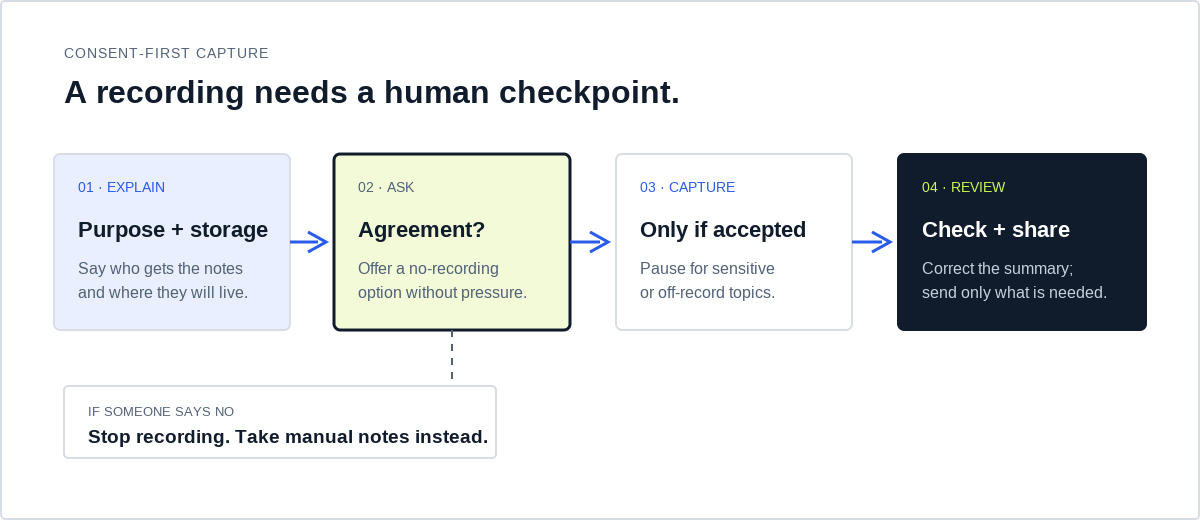
The recorder should not be the first person to tell the room that recording has started.
What changed
The Bee Frontier can be worn on the wrist or clipped to clothing; Bee Eclipse attaches to a phone. The devices are designed to turn spoken plans into summaries, reminders, and suggested actions. TechCrunch reported prices of $74.99 for Frontier and $99.99 for Eclipse, plus an optional $11.99 monthly subscription for expanded features and integrations. Amazon says audio is processed and deleted, and transcripts are encrypted with keys controlled by the user’s device. (TechCrunch)
That makes capture easier. It also makes it easier to record someone who did not expect a microphone to be there. A visible recording indicator helps, but it does not replace a plain explanation. Privacy depends on the whole path: what is captured, which account receives it, which apps can access the result, and whether a summary or task is sent to someone else.
| Choice | What it can do | Main consideration |
|---|---|---|
| Dedicated AI recorder | Capture hands-free and create a transcript, summary, or tasks | People nearby may not notice it; check account, retention, and connected apps |
| Meeting software transcription | Record or transcribe a scheduled online meeting | Use the meeting notice and host controls; confirm who can download the transcript |
| Manual notes | Record decisions and owners without a full transcript | Takes attention, but captures less personal information |
| After-meeting recap | Write down decisions from memory and ask AI to format them | No live recording; details may be incomplete, so confirm with attendees |
No single method fits every conversation. A public planning meeting and a private medical appointment call for different choices.
Consent is a workflow step, not a feature setting
Recording rules differ by location and situation. Workplace policy, contracts, professional duties, and local law can impose additional requirements. This article is practical guidance, not legal advice. When requirements are unclear, do not record until you have checked the applicable policy or received appropriate guidance.
For routine meetings, use a short opening before you press record:
“I’d like to record this so I can produce accurate notes and action items. The recap will go to [people], and the transcript will be stored in [system]. Is anyone uncomfortable with recording? We can take notes manually instead.”
Wait for an answer. If someone declines, stop recording and switch methods. For a mixed room or a call with people in different locations, do not assume one person’s agreement covers everyone else. Tell late arrivals before continuing. If the purpose or audience changes, explain that too.
Do not use a personal recorder to get around a work rule or a participant’s refusal. A device’s recording light can show that it is active, but people may not know what is stored, where it goes, or who will receive the output.
Keep the transcript smaller than the conversation
A transcript stores much more than a list of decisions. It may include side comments, names, personal details, confidential plans, or a participant’s uncertainty that was never meant to be a formal record. Before recording, define the useful output: decisions, owners, deadlines, and unresolved questions. If a full transcript is not needed, do not keep one by default.
| Before recording | After the meeting |
|---|---|
| State the purpose and who will receive notes | Check names, figures, owners, and due dates |
| Ask for agreement and provide a no-recording option | Remove irrelevant personal or confidential details |
| Use an approved account and device | Correct errors before sharing or creating tasks |
| Pause for sensitive topics or off-record portions | Delete audio/transcripts according to policy |
| Disable integrations you do not need | Confirm calendar invites and emails before sending |
AI summaries can misattribute a statement, invent a task, or miss a qualification. Treat every action item as a draft. Check the source audio or ask the person named before you create a calendar event, send an email, or mark work as agreed.
Put it to work: a five-minute meeting close
- Confirm the record: Tell attendees whether a transcript or audio file exists and where it is stored.
- Review decisions: Ask the AI to list only decisions, owners, dates, and open questions. Leave out general discussion.
- Check attribution: Verify each person’s name and commitment. Do not infer agreement from a suggestion.
- Approve actions: Create invites and follow-up messages only after a person checks each one.
- Limit retention: Keep the approved summary if policy allows; remove the raw transcript when it is no longer needed.
A useful prompt for a transcript you are authorized to process:
Create meeting notes with four headings: Decisions, Action items,
Open questions, and Items to confirm. Quote no more than needed.
For every action, include the speaker only when attribution is clear.
Do not create calendar events or send messages. Mark uncertain details
as “check with the group,” and do not fill gaps by guessing.
The rule worth keeping
Use AI recording when it solves a real note-taking problem, the people involved know what is happening, and you can control the transcript afterward. For sensitive or informal conversations, ask first and use manual notes if there is any doubt.
Sources
This week’s AI news
Snapshot for 2026-10-14 through 2026-10-20.
The week brought practical AI tools closer to everyday work, while new recording devices and government security restrictions underscored the privacy and trust tradeoffs. (TechCrunch, Reuters)
Readers are weighing whether AI can take notes and complete computer tasks without exposing personal conversations or sensitive files, as chipmakers continue building for future demand. (CBS News, TechCrunch, Reuters)
Model releases & benchmarks (the “excitement” beat)
- Meta released Muse Spark Open, an open-weight model designed to run locally on high-end Macs: Meta says it has 816 billion total parameters and can support coding and agent workflows. Its advertised desktop setup uses two M5 Ultra Mac Studios, so this is not a practical local model for most personal computers; performance examples and benchmarks are Meta’s own claims. (Meta AI Research, TechCrunch)
- Nvidia introduced open-weight models for enterprise agents and local PCs: Its 120-billion-parameter Nemotron 3.5 Super VL targets enterprise workflows, while smaller Bolt models are intended for local computers. Nvidia says Super VL performs faster than named competitors on selected specialized tasks; those are company claims, not independent results. (TechCrunch, Nvidia)
Funding, infrastructure & economics (the “boom or bubble?” beat)
- ASML said customers are already interested in chipmaking-tool orders for 2029 and 2030: The company cited AI-driven demand and said its planned capacity for 2027 and 2028 would not fully meet customer demand. The order interest points to continued investment in the infrastructure behind AI, though it does not guarantee that every planned project will be built. (Reuters, CNBC)
Safety, security & governance (the “anxious” beat)
- The US ordered DeepSeek products removed from civilian federal IT systems: Reuters reported that the Department of Homeland Security cited risks including potential sensitive-data transfers and security vulnerabilities. This is a government restriction based on stated risk concerns, not a public finding that DeepSeek has transferred federal data. (Reuters, CNA)
Backlash, labor & trust (the skeptical beat)
- Amazon’s Bee launched AI devices that record conversations to produce notes and reminders: The wearable and phone attachment can turn discussions into summaries and action items, and connect with calendar and email tools. Amazon says audio is processed and deleted, while reporting highlights that the devices listen while activated; anyone considering one should weigh consent and privacy alongside convenience. (TechCrunch, CBS News)
Free weekly briefing
Get the next issue
Practical AI intelligence, delivered weekly.
Email address
By subscribing, you agree to receive the weekly newsletter. Unsubscribe at any time.Privacy details.
Open the signup page if the form does not load.